Перейти к основному содержанию

47 постов с тегом "версия"

Показать все теги

Electron 39.0.0

· 4 мин. прочитано

Electron 39.0.0 вышел! It includes upgrades to Chromium 142.0.7444.52, V8 14.2, and Node 22.20.0.


Команда Electron рада объявить о выпуске Electron 39.0.0! You can install it with npm via npm install electron@latest or download it from our releases website. Continue reading for details about this release.

If you have any feedback, please share it with us on Bluesky or Mastodon, or join our community Discord! Bugs and feature requests can be reported in Electron's issue tracker.

Notable Changes

ASAR Integrity graduates to stable

A long-standing "experimental" feature -- ASAR integrity -- is now stable in Electron 39. When you enable this feature, it validates your packaged app.asar at runtime against a build-time hash to detect any tampering. If no hash is present or if there is a mismatch in the hashes, the app will forcefully terminate.

See the ASAR integrity documentation for full information on how on the feature works, on how to use it in your application, and how to use it in Electron Forge and Electron Packager.

In related news, Electron Packager v19 now enables ASAR by default. #1841

Electron 38.0.0

· 5 мин. прочитано

Electron 38.0.0 вышел! It includes upgrades to Chromium 140.0.7339.41, V8 14.0, and Node 22.16.0.


Команда Electron рада объявить о выпуске Electron 38.0.0! You can install it with npm via npm install electron@latest or download it from our releases website. Continue reading for details about this release.

If you have any feedback, please share it with us on Bluesky or Mastodon, or join our community Discord! Bugs and feature requests can be reported in Electron's issue tracker.

Electron 37.0.0

· 7 мин. прочитано

Electron 37.0.0 вышел! It includes upgrades to Chromium 138, V8 13.8, and Node 22.16.0.


Команда Electron рада объявить о выпуске Electron 37.0.0! You can install it with npm via npm install electron@latest or download it from our releases website. Continue reading for details about this release.

If you have any feedback, please share it with us on Bluesky or Mastodon, or join our community Discord! Bugs and feature requests can be reported in Electron's issue tracker.

Google Summer of Code Begins

Our two Google Summer of Code contributors have started the program's coding period!

  • @nilayarya is crafting a new Save/Restore Window State API in Electron core. The new APIs will provide a built-in, standardized way to handle window state persistence. See Nilay's in-progress RFC at electron/rfcs#16.
  • @hitarth-gg is hard at work modernizing the long-dormant Devtron extension using Chrome Manifest V3 APIs. This project will provide tooling for developers to debug IPC communication, track event listeners, and visualize module dependencies in their Electron applications.

It has been an exciting couple of weeks for our GSOC participants, so stay tuned for more updates!

Notable Changes

Smooth Corners: Native CSS Squircles

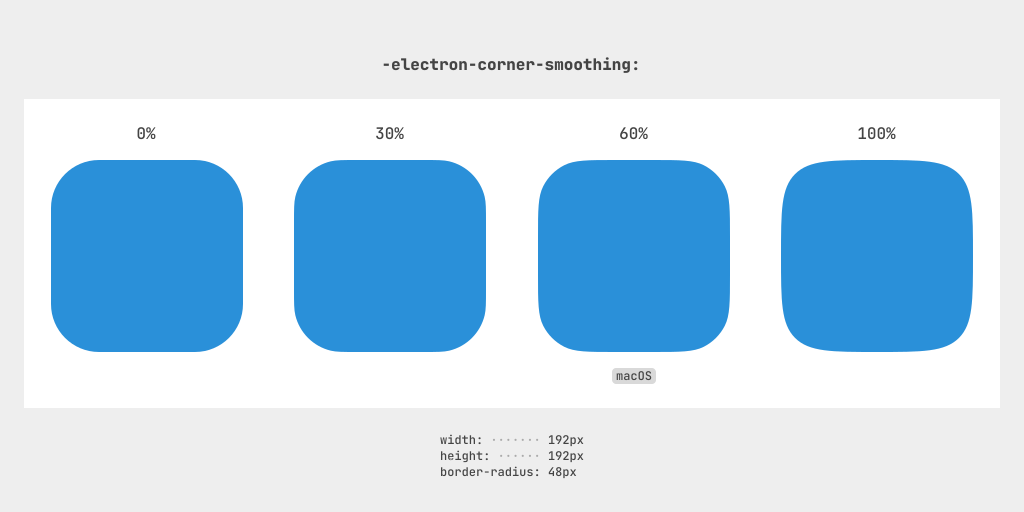
An image showing different corner smoothing values (0%, 30%, 60%, and 100%) applied to rectangles, with 60% labeled as matching macOS style

Electron 37 introduces the custom -electron-corner-smoothing CSS property, which allows apps to create smoother rounded corners to match Apple's macOS design language. This feature originally landed in Electron 36, but we felt like it deserved a brighter spotlight.

Example with 100% Corner Smoothing

CodeResult
.box {
width: 128px;
height: 128px;
border-radius: 24px;
-electron-corner-smoothing: 100%;
}

Unlike the standard border-radius property, which carves quarter-circle corners out of a rectangle, -electron-corner-smoothing smoothly transitions the curve into a squircle shape with a continuous perimeter.

You can adjust the smoothness using values from 0% to 100%, or use the system-ui value to match the operating system's style (60% on macOS and 0% otherwise). This design enhancement can be applied on borders, outlines, and shadows, giving your app a subtle layer of polish.

подсказка

Read more about Electron's squircle implementation in @clavin's RFC 0012. The document goes over the motivation and technical implementation in more detail.

The initial design drew inspiration from Figma's corner smoothing implementation. Read more about their own quest for smooth corners in "Desperately seeking squircles".

Electron 36.0.0

· 5 мин. прочитано

Electron 36.0.0 вышел! It includes upgrades to Chromium 136, V8 13.6, and Node 22.14.0.


Команда Electron рада объявить о выпуске Electron 36.0.0! You can install it with npm via npm install electron@latest or download it from our releases website. Continue reading for details about this release.

If you have any feedback, please share it with us on Bluesky or Mastodon, or join our community Discord! Bugs and feature requests can be reported in Electron's issue tracker.

Notable Changes

Writing Tools Support

In Electron 36, you can enable macOS system-level features like Writing Tools (spelling and grammar), Autofill, and Services menu items in your context menus. To do so, pass a WebFrameMain instance into the frame parameter for menu.popup().

import { BrowserWindow, Menu, WebFrameMain } from 'electron';

const currentWindow = BrowserWindow.getFocusedWindow();
const focusedFrame = currentWindow.webContents.focusedFrame;
const menu = Menu.buildFromTemplate([{ label: 'Copy', role: 'copy' }]);

menu.popup({
window: currentWindow,
frame: focusedFrame,
});

Electron 35.0.0

· 6 мин. прочитано

Electron 35.0.0 вышел! It includes upgrades to Chromium 134.0.6998.44, V8 13.5, and Node 22.14.0.


Команда Electron рада объявить о выпуске Electron 35.0.0! You can install it with npm via npm install electron@latest or download it from our releases website. Continue reading for details about this release.

If you have any feedback, please share it with us on Bluesky or Mastodon, or join our community Discord! Bugs and feature requests can be reported in Electron's issue tracker.

Notable Changes

Service Worker Preload Scripts for Improved Extensions Support

Originally proposed in RFC #8 by @samuelmaddock, Electron 35 adds the ability to attach a preload script to Service Workers. With Chrome's Manifest V3 Extensions routing a lot of work through extension service workers, this feature fills in a gap in Electron's support for modern Chrome extensions.

When registering a preload script programmatically at the Session level, you can now specifically apply it to Service Worker contexts with the ses.registerPreloadScript(script) API.

Main Process
// Add our preload realm script to the session.
session.defaultSession.registerPreloadScript({
// Our script should only run in service worker preload realms.
type: 'service-worker',
// The absolute path to the script.
script: path.join(__dirname, 'extension-sw-preload.js'),
});

Furthermore, IPC is now available between Service Workers and their attached preload scripts via the ServiceWorkerMain.ipc class. The preload script will still use the ipcRenderer module to communicate with its Service Worker. See the original RFC for more details.

This feature was preceded by many other changes that laid the groundwork for it:

  • #45329 redesigned the Session module's preload APIs to support registering and unregistering individual preload scripts.
  • #45229 added the experimental contextBridge.executeInMainWorld(executionScript) script to evaluate JavaScript in the main world over the context bridge.
  • #45341 added the ServiceWorkerMain class to interact with Service Workers in the main process.

Electron 34.0.0

· 4 мин. прочитано

Electron 34.0.0 вышел! It includes upgrades to Chromium 132.0.6834.83, V8 13.2, and Node 20.18.1.


Команда Electron рада объявить о выпуске Electron 34.0.0! You can install it with npm via npm install electron@latest or download it from our releases website. Continue reading for details about this release.

If you have any feedback, please share it with us on Bluesky or Mastodon, or join our community Discord! Bugs and feature requests can be reported in Electron's issue tracker.

Notable Changes

HTTP Compression Shared Dictionary Management APIs

HTTP compression allows data to be compressed by a web server before being received by the browser. Modern versions of Chromium support Brotli and Zstandard, which are newer compression algorithms that perform better for text files than older schemes such as gzip.

Custom shared dictionaries further improve the efficiency of Brotli and Zstandard compression. See the Chrome for Developers blog on shared dictionaries for more information.

@felixrieseberg added the following APIs in #44950 to manage shared dictionaries at the Session level:

  • session.getSharedDictionaryUsageInfo()
  • session.getSharedDictionaryInfo(options)
  • session.clearSharedDictionaryCache()
  • session.clearSharedDictionaryCacheForIsolationKey(options)

Unresponsive Renderer JavaScript Call Stacks

Electron's unresponsive event occurs whenever a renderer process hangs for an excessive period of time. The new WebFrameMain.collectJavaScriptCallStack() API added by @samuelmaddock in #44204 allows you to collect the JavaScript call stack from the associated WebFrameMain object (webContnets.mainFrame).

This API can be useful to determine why the frame is unresponsive in cases where there's long-running JavaScript events causing the process to hang. For more information, see the proposed web standard Crash Reporting API.

Main Process
const { app } = require('electron');

app.commandLine.appendSwitch(
'enable-features',
'DocumentPolicyIncludeJSCallStacksInCrashReports',
);

app.on('web-contents-created', (_, webContents) => {
webContents.on('unresponsive', async () => {
// Interrupt execution and collect call stack from unresponsive renderer
const callStack = await webContents.mainFrame.collectJavaScriptCallStack();
console.log('Renderer unresponsive\n', callStack);
});
});
предупреждение

This API requires the 'Document-Policy': 'include-js-call-stacks-in-crash-reports' header to be enabled. See #45356 for more details.

Electron 33.0.0

· 5 мин. прочитано

Electron 33.0.0 вышел! It includes upgrades to Chromium 130.0.6723.44, V8 13.0, and Node 20.18.0.


Команда Electron рада объявить о выпуске Electron 33.0.0! You can install it with npm via npm install electron@latest or download it from our releases website. Continue reading for details about this release.

If you have any feedback, please share it with us on Twitter or Mastodon, or join our community Discord! Bugs and feature requests can be reported in Electron's issue tracker.

Notable Changes

  • Added a handler, app.setClientCertRequestPasswordHandler(handler), to help unlock cryptographic devices when a PIN is needed. #41205
  • Extended navigationHistory API with 2 new functions for better history management. #42014
  • Improved native theme transparency checking. #42862

Electron 32.0.0

· 5 мин. прочитано

Electron 32.0.0 вышел! It includes upgrades to Chromium 128.0.6613.36, V8 12.8, and Node 20.16.0.


Команда Electron рада объявить о выпуске Electron 32.0.0! You can install it with npm via npm install electron@latest or download it from our releases website. Continue reading for details about this release.

If you have any feedback, please share it with us on Twitter or Mastodon, or join our community Discord! Bugs and feature requests can be reported in Electron's issue tracker.

Notable Changes

  • Added new API version history in our documentation, a feature created by @piotrpdev as part of Google Summer of Code. You can learn more about it in this blog post. #42982
  • Removed nonstandard File.path extension from the Web File API. #42053
  • Aligned failure pathway in Web File System API with upstream when attempting to open a file or directory in a blocked path. #42993
  • Added the following existing navigation-related APIs to webcontents.navigationHistory: canGoBack, goBack, canGoForward, goForward, canGoToOffset, goToOffset, clear. The previous navigation APIs are now deprecated. #41752

Electron 31.0.0

· 4 мин. прочитано

Electron 31.0.0 вышел! It includes upgrades to Chromium 126.0.6478.36, V8 12.6, and Node 20.14.0.


Команда Electron рада объявить о выпуске Electron 31.0.0! You can install it with npm via npm install electron@latest or download it from our releases website. Continue reading for details about this release.

If you have any feedback, please share it with us on Twitter or Mastodon, or join our community Discord! Bugs and feature requests can be reported in Electron's issue tracker.

Notable Changes

  • Extended WebContentsView to accept pre-existing webContents object. #42319
  • Added support for NODE_EXTRA_CA_CERTS. #41689
  • Updated window.flashFrame(bool) to flash continuously on macOS. #41391
  • Removed WebSQL support #41868
  • nativeImage.toDataURL will preserve PNG colorspace #41610
  • Extended webContents.setWindowOpenHandler to support manual creation of BrowserWindow. #41432

Electron 30.0.0

· 5 мин. прочитано

Electron 30.0.0 вышел! It includes upgrades to Chromium 124.0.6367.49, V8 12.4, and Node.js 20.11.1.


Команда Electron рада объявить о выпуске Electron 30.0.0! You can install it with npm via npm install electron@latest or download it from our releases website. Continue reading for details about this release.

If you have any feedback, please share it with us on Twitter or Mastodon, or join our community Discord! Bugs and feature requests can be reported in Electron's issue tracker.

Notable Changes

  • ASAR Integrity fuse now supported on Windows (#40504)
    • Existing apps with ASAR Integrity enabled may not work on Windows if not configured correctly. Apps using Electron packaging tools should upgrade to @electron/packager@18.3.1 or @electron/forge@7.4.0.
    • Take a look at our ASAR Integrity tutorial for more information.
  • Added WebContentsView and BaseWindow main process modules, deprecating & replacing BrowserView (#35658). Learn more about how to migrate from BrowserView to WebContentsView in this blog post.
    • BrowserView is now a shim over WebContentsView and the old implementation has been removed.
    • See our Web Embeds documentation for a comparison of the new WebContentsView API to other similar APIs.
  • Implemented support for the File System API (#41827)